Why Did My API Request Fail? Troubleshooting Your First API Calls
Written by Ahmed at Analyst Engineering, a Senior Technical Business Analyst with 10+ years in banking and payments delivery. Last reviewed .
Key takeaways
- Triage a failed API request by first asking whether the server responded at all: no status code means a network, DNS, proxy, or certificate problem, while any status code means the request arrived and the answer is in the response.
- Most first-week API failures come from the client side: the wrong environment selected, a variable that never resolved and was sent literally as {{baseUrl}}, a missing Bearer prefix, or a JSON body pasted with curly quotes.
- On corporate networks, 'unable to get local issuer certificate' usually means a proxy is inspecting TLS; the fix is adding the corporate CA certificate to Bruno or Postman, not disabling certificate verification.
- CORS errors only happen in browsers; Bruno, Postman, and curl do not enforce CORS, which is why a request can work in an API client and fail from a web page.
- Always read the response body of a 4xx error before changing anything: well-designed APIs name the failing field and the rule, and the fix is usually in that sentence.
When an API request fails, the fastest fix comes from asking questions in the right order: did the server respond at all, which environment did it go to, what status came back, and what does the response body say? Most failures in an analyst’s first weeks with APIs are client-side and take a minute to fix once you know where to look.
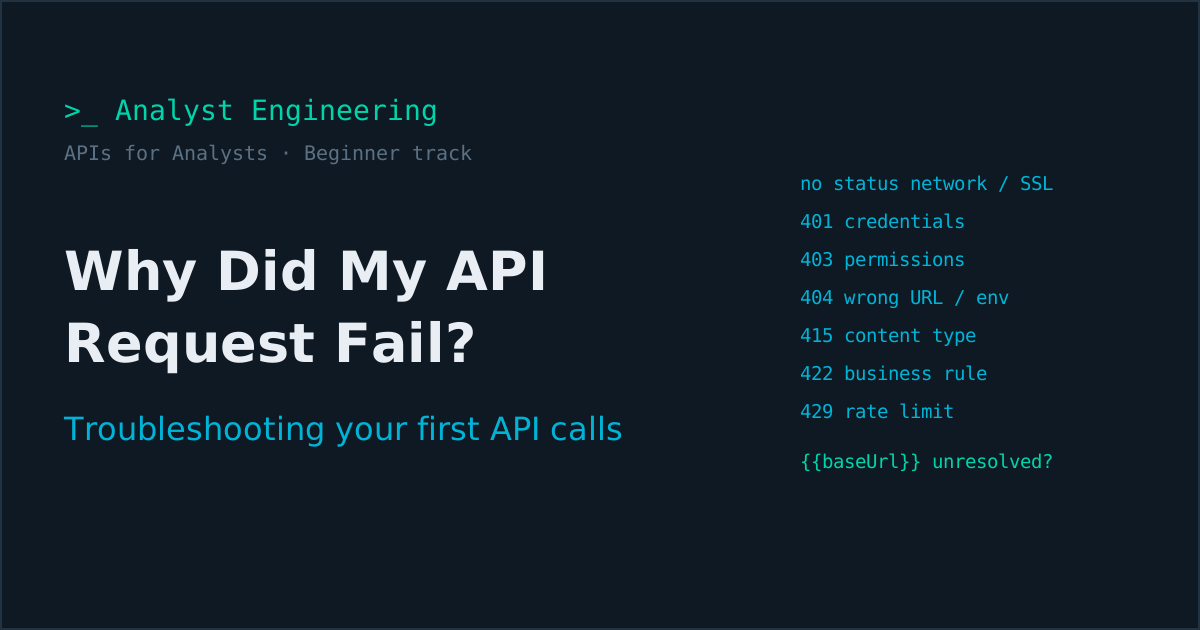
To troubleshoot a failed API request: first check whether there is any status code. No status code means the request never got a response, so the cause is DNS, the network, a VPN, a proxy, or an SSL certificate. A status code means the server received it: read the response body, then match the code. 401 is credentials, 403 is permissions, 404 is usually the wrong URL or environment, 415 is the content type, 422 is a business rule, 429 is a rate limit, and 5xx is the server’s problem, so capture the trace ID and report it. Before anything else, open the client’s timeline or console and look at the request that was actually sent.
APIs for Analysts, beginner track. Best read after Part 2, your first API collection. Full learning path: APIs for Analysts.
Almost every analyst hits these walls in the first week, and the SSL certificate error on a corporate network is where many give up, which is a pity, because it has a five-minute fix. Once the calls work, designing what to assert on them is covered in API Testing and QA Mastery for BAs.
What should you check first when an API request fails?
Five questions, in this order. They take under a minute and resolve most failures before you read any further.
- Is there a status code? No code means it never reached a server that answered. Jump to the connection section.
- What was actually sent? Open the Timeline in Bruno or the Console in Postman and read the final URL, headers, and body. Look for literal
{{variables}}. - Which environment is selected? The dropdown in the top right. A surprising share of failures are “right request, wrong environment”.
- What does the response body say? Good APIs name the field and the rule. Read it before changing anything.
- What changed since it last worked? A new token, a different network, a new environment, a colleague’s edit to the collection.
Why did I get no response at all?
When there is no status code, the request failed before any API could answer. The error text tells you which layer.
| Error text (varies by tool) | What it means | Usual fix |
|---|---|---|
getaddrinfo ENOTFOUND, “Could not resolve host” | The hostname could not be found | Fix typos; connect to the VPN for internal hosts; check the URL is not literally {{baseUrl}}/... |
ECONNREFUSED, “Connection refused” | The host exists but nothing is listening on that port | Service is down, wrong port, or your local mock is not running (Prism uses port 4010 by default) |
ETIMEDOUT, “Request timed out” | No answer within the time limit | VPN, firewall, or proxy blocking the route; or a slow endpoint and a short timeout |
| ”unable to get local issuer certificate”, “self signed certificate in certificate chain” | The TLS certificate could not be verified | Add your corporate CA certificate to the client (see below) |
| “certificate has expired”, “hostname mismatch” | The server’s certificate is genuinely wrong | Report it; do not work around it for anything beyond an isolated test |
ECONNRESET, “socket hang up” | The connection was closed mid-request | Proxy interference, or the server crashed; retry once, then report |
Why do SSL certificate errors happen on corporate networks?
Many banks and large companies inspect HTTPS traffic with a proxy that re-signs it using the company’s own certificate authority. Your browser trusts that authority because IT installed it; your API client does not, so it refuses the connection with “unable to get local issuer certificate”.
The fix is to give the client that certificate:
- Get the corporate root CA certificate from your IT or security team, usually as a
.pemor.crtfile. - Postman: Settings, then Certificates, then add it under CA certificates.
- Bruno: Preferences, then the SSL or certificate settings, and add the custom CA certificate. For pipelines, the Bruno CLI accepts it with
--cacert. - If traffic must go through a proxy, set it in the client’s proxy settings or let the client use the system proxy.
The tempting alternative is switching off SSL certificate verification. Do not make that your habit: it hides genuine certificate problems and, on anything carrying real data, it is exactly the kind of setting a security review flags. Use it only briefly, on an isolated test environment, to confirm the diagnosis, then add the certificate properly.
Why am I getting 400 Bad Request?
The server received the request but could not parse it or it broke the schema. Read the body first; then check these, in order of how often they bite:
- Curly quotes. JSON copied from Word, Outlook, Teams, or Confluence often contains
“smart quotes”instead of"straight quotes". The body looks right and is invalid. Paste into the client’s JSON editor and look for red highlighting. - Trailing commas.
{ "amount": "10.00", }is invalid JSON. - Wrong types.
"amount": 10.00sent where the contract requires the string"10.00". - Missing required fields, or a field name with the wrong casing,
endToEndIDinstead ofendToEndId. - Body type mismatch. A JSON body sent with the body type set to text, or form fields sent to an API expecting JSON. Stripe, for example, expects form-encoded request bodies.
Why am I getting 401 Unauthorized?
401 means the API did not accept who you are. The credential is missing, wrong, or expired.
| Check | How it goes wrong |
|---|---|
| Is the token expired? | OAuth access tokens often last an hour. Get a fresh one. |
| Is it the right environment’s token? | A SIT token sent to UAT is rejected. |
| Is the header format right? | Must be Authorization: Bearer <token>: missing Bearer, or Bearer Bearer when the client adds it and so did you. |
| Is auth actually applied? | The request is set to No Auth instead of Inherit from the collection. |
| Did the variable resolve? | The header literally says Bearer {{accessToken}} because the wrong environment is selected. |
| Is it the right credential type? | An API key sent as a bearer token, or a header name typo such as x-api-Key. |
The actual sent headers, visible in Bruno’s timeline or Postman’s console, answer every row of that table in one look. Credential types and lifetimes are explained in API keys, PATs, and OAuth tokens.
Why am I getting 403 Forbidden?
403 means the API knows who you are and says no. The token is valid but not allowed to do this.
- Missing scope. A
payments:readtoken calling a write endpoint. - Missing role or entitlement. Your test user does not have the permission in that environment.
- IP allowlisting. The API only accepts calls from approved networks, and you are off the VPN.
- Object-level rules. You may call the endpoint, but not for that customer or account.
Asking for “more access” is rarely the right fix. Ask for the specific scope or role the endpoint documents, in the specific environment you need.
Why am I getting 404 Not Found when the endpoint exists?
Look at the resolved URL character by character. Almost every analyst 404 is one of these:
- Wrong environment or base URL. The path exists in SIT; you are pointed at DEV.
- Missing version or prefix.
/paymentsinstead of/v1/paymentsor/api/v1/payments. - Unresolved path parameter. The URL contains
{{paymentId}}or:idliterally, because the chaining step never captured the value. - An ID from another environment. A payment created in SIT does not exist in UAT.
- Trailing slash. Some APIs treat
/payments/and/paymentsdifferently. - Hidden by design. Some APIs return
404for resources you may not see, so they do not confirm the resource exists. GitHub does this for private repositories.
What do 405, 406, 409, 413, 415, and 422 mean for my request?
| Code | Meaning | What to change |
|---|---|---|
405 Method Not Allowed | The path exists but not with this method | POST instead of PUT, or the reverse; check the contract |
406 Not Acceptable | The API cannot return the format you asked for | Fix the Accept header, usually application/json |
409 Conflict | The request clashes with current state | A reused idempotency key with a different body, or an action not allowed in the resource’s current status |
413 Content Too Large | The body exceeds a size limit | Smaller payload or file |
415 Unsupported Media Type | The body format is not accepted | Set Content-Type: application/json, or the form-encoded type the API expects |
422 Unprocessable Content | Valid structure, but a business rule failed | Read the error code and field; this is usually correct behavior, and often exactly what you are testing |
A 422 deserves a second look before you “fix” it. If you sent an amount above the limit and got AMOUNT_LIMIT_EXCEEDED, the API is right and your test data is the problem, or you just proved a negative test case.
What do 429 and the 5xx errors mean?
429 Too Many Requests means you hit a rate limit. Check the Retry-After header and any rate limit headers such as GitHub’s X-RateLimit-Remaining. The usual culprits are a collection runner loop, a data-driven run with hundreds of rows, or a shared credential that the whole team is using at once. Add a delay between requests or authenticate for a higher limit.
500 Internal Server Error means the server failed unexpectedly. Your request may be unusual, but handling it is the API’s job. Retry once; if it repeats, report it with the trace ID.
502 Bad Gateway, 503 Service Unavailable, 504 Gateway Timeout mean something behind the gateway is down or slow. Check whether the environment is being deployed, look at the provider’s status page for external APIs, and retry later. For a payment POST, retry with the same idempotency key, because a 504 does not tell you whether the payment was created.
Why does it work in one place but not another?
Works in Postman or Bruno, fails from a web page. That is almost always CORS. Browsers block a page from reading responses from another origin unless the API sends Access-Control-Allow-Origin headers that permit it. API clients and curl do not enforce CORS at all. The fix is the API’s CORS configuration, and it is a developer or platform change, not a client setting.
Works in the browser, fails in the API client. The browser is sending something you are not: a session cookie, a CSRF token, or a header added by the front end. Use Copy as cURL from the browser’s Network tab to see the exact request, then compare.
Works for my colleague, fails for me. Compare in this order: selected environment, the local values of variables (which do not sync), a missing .env file, VPN connection, the corporate CA certificate, and client version.
Returns 200 but the data is wrong. Check the environment first. Then check timing: in an asynchronous API, a GET straight after a POST may show the previous state because processing has not finished. That is not a defect; it is how asynchronous systems behave, as synchronous vs asynchronous explains, and polling handles it, as shown in Part 6.
How do you ask for help with a failing request?
Send everything needed to reproduce it, in one message. Developers answer complete messages first.
Environment: SIT
Time (UTC): 2026-09-15 10:42
Request: POST https://sit.payments.internal/v1/payments
Headers: Content-Type: application/json, Authorization: Bearer [redacted],
         Idempotency-Key: 3f1c...
Body: { ...redacted test data... }
Response: 422
Body: { "errors": [{ "code": "IBAN_CHECKSUM_INVALID", "field": "creditor.iban" }],
        "traceId": "a1b2c3d4" }
Expected: 201, because the IBAN passes checksum validation in our validator
Tried: fresh token, confirmed environment, same result from curl
The trace ID is the most valuable line: it lets the developer find your exact request in the logs in seconds, which is the skill in reading production logs. Redact tokens, keys, and any real personal data before sending, every time.
The APIs for Analysts learning path
Beginner: What is an API · API glossary · JSON for analysts · HTTP status codes · Your first collection · Why did my API request fail? (you are here) · Reading an API contract
Intermediate: Analyze an API · Document an API · API test cases · Chaining and scripts · Webhooks · GraphQL
Advanced: POCs and demos · API design review · Versioning and breaking changes · API security testing · API tests in CI
The takeaway
Troubleshoot failed API requests in order. No status code means the network layer: DNS, VPN, proxy, or certificates, and on corporate networks the certificate fix is adding the company CA to your client. A status code means the server answered: read the body, then match the code, with 401 for credentials, 403 for permissions, 404 for the wrong URL or environment, 415 for the content type, 422 for a business rule, 429 for rate limits, and 5xx for the server. Always inspect the request that was actually sent, remember CORS only exists in browsers, and ask for help with a complete, redacted, replayable message.
If you are stuck on your own project’s API and want a second pair of eyes, book a 1:1 Tech BA Coaching Call. If the basics are the gap, API Fundamentals for Analysts starts from confused and ends at confident. Once requests work, API Testing and QA Mastery for BAs covers what to test with them.
Ahmed is a Senior Technical Business Analyst with 10+ years in banking and payments. He builds practical guides and tools for analysts at The Tech BA Toolkit.
Tags: API, Troubleshooting, Postman, Bruno, Beginners
About the author
Analyst Engineering is written by Ahmed, a Senior Technical Business Analyst with 10+ years of banking and payments delivery experience: ISO 20022 and SWIFT messaging, payments API integration, Kafka event validation, and production support. Every article comes from real delivery work, and each one is reviewed and updated as tools and standards change.
Related articles
- Your First API Collection in Bruno and Postman: Requests, Environments, and Variables Build a first API collection in Bruno and Postman: environments, variable precedence, inherited auth, secrets in .env or a vault, and cURL imports.
- HTTP Status Codes Explained: What 200, 202, and 409 Really Mean An analyst's guide to HTTP status codes: the 2xx, 4xx, and 5xx families, what each common code means, and why 202 Accepted vs 200 OK matters in payments.
- API Glossary for Analysts: The Terms You Hear in Every Integration Meeting A plain-language API glossary for analysts: endpoint, payload, headers, tokens, idempotency, webhooks, pagination, and more, each with a real-world example.
- Reading Production Logs: Trace One Transaction's Trail How an analyst reads production logs to debug a system: correlation ids, log levels, searching by transaction, and following one request across services.
Go deeper on this
Not ready to buy? The free downloads are a no-cost place to start, and every article here stays free.
Free account
Practice on the Labs, keep your progress
A free account, no password: an email link signs you in. It saves your steps and self-assessments on the Labs, shows your missions on a dashboard, unlocks the solutions, and, if you tick the box, sends you new missions and articles when they ship.
Your email is used to sign you in. Nothing else, unless you ask. Privacy.